
For device teams
Track intake, repair status, assignment, comments, and pickup readiness.
FlowStack Ticketing
FlowStack Ticketing keeps repair requests, assignments, status changes, notes, and follow-through visible without turning device repair into a complex help desk rollout.
See the workspace
The public demo shows synthetic tickets, priority signals, filters, assignments, and pickup-ready work. Nothing in the demo belongs to a real school.
Open the synthetic demo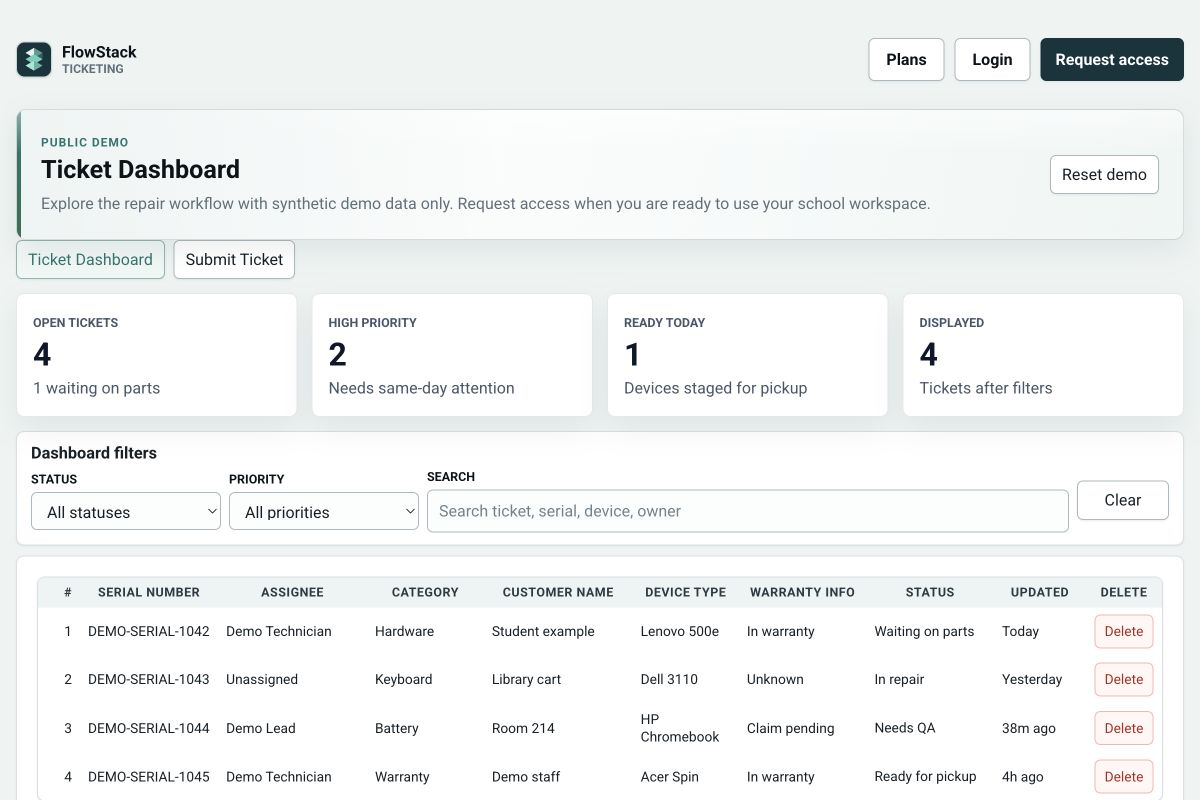
Best fit
Use it when your team needs a straightforward repair request queue rather than a full enterprise help desk.
Track intake, repair status, assignment, comments, and pickup readiness.
Give staff a clearer way to submit and follow repair requests.
Preview a synthetic ticket dashboard before opening a real workspace.
How it works
Keep student technicians, staff helpers, and administrators oriented around the same repair record.
Record the requester, device, serial number, issue, priority, and notes.
Assign responsibility and move work through waiting, repair, QA, and pickup states.
Use comments, history, queue views, and analytics to keep follow-through visible.
Questions
It is used to track school device repair requests from intake through assignment, status updates, notes, and pickup readiness.
No. FlowStack Ticketing is intentionally focused on school repair workflows for teams that need a simpler repair queue.
Yes. The public demo uses synthetic repair data so schools can preview the workflow before choosing a plan.
Yes. Role-aware access can keep administrators, staff helpers, and student requesters focused on the tools and repair information intended for them.
Next step
Teacher Pro includes 12 requester accounts and 100 active tickets, with one of each published monthly add-on available. Use the demo for the interface, or request a personalized School / Department quote when your needs exceed those limits.